
Question types
Build a form from blocks. Some ask a question, some lay the page out, and the picker groups them by what they do.
Updated
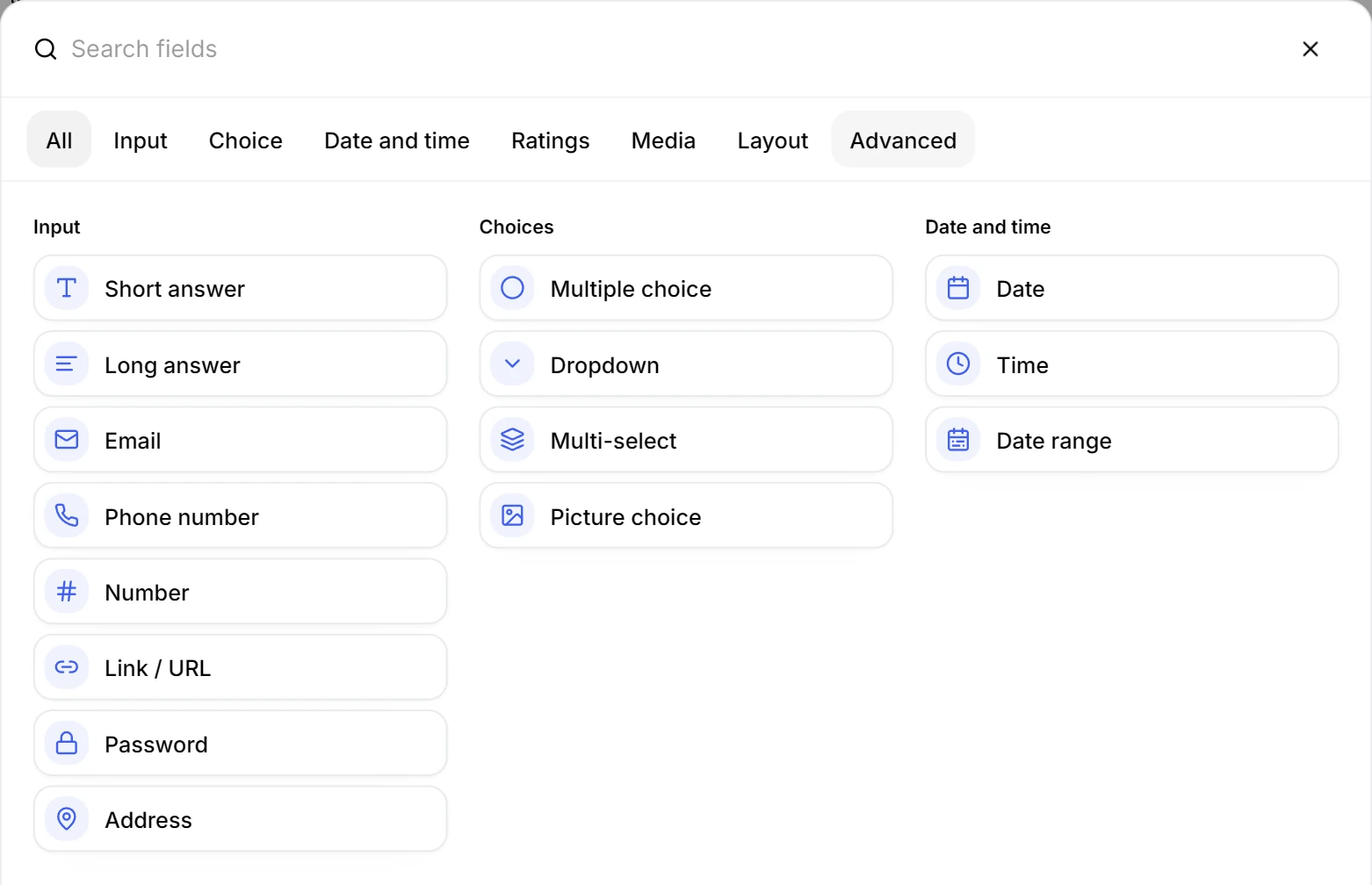
Click Add field to open the picker. Its categories match the headings below, and the search box finds a block by name rather than by category.
Find a block in the picker
The picker opens over the builder. Search it when you know the name, or switch category when you know the job.
Collect text, numbers and links
These blocks take a typed answer, and each one checks what it is given. A bad address or a malformed email is caught while the person is still on the question.
- Short answer: one line, for a name or a job title.
- Long answer: an open answer, in a box sized to the space it needs.
- Email: checks the address is well formed, so a typo never becomes a bounce.
- Phone number: collects a number in a shape you can call.
- Number: digits only, with a currency format when the answer is money.
- Link / URL: a web address, checked at entry.
- Password: hides the answer as it is typed.
- Address: the parts of an address in their own fields, so they export cleanly.
Offer a set of options
Use a choice block when the answer comes from a list you control, rather than from whatever the person types.
- Multiple choice: one answer from a list. A switch allows several, so one block covers checkboxes too.
- Dropdown: one answer from a long list, which keeps twenty options the height of one line.
- Multi-select: several answers from a searchable list, for skills or tags.
- Picture choice: options as images, which reads faster than a list of words.
A choice answer also drives conditional logic and quiz scoring, because both need a value they can compare.
Ask for a date, a time or a file
- Date: a date picker, with the allowed days set in the block settings.
- Time: a time picker.
- Date range: two dates, for a stay or a booking window.
- File upload: a document or an image, with the accepted types set per block. People upload without signing in.
- Signature: a drawn signature, for consent or a delivery note.
- Color picker: a colour as an answer, for a brand or a preference.
A date answer is a real date, so a rule can branch on before and after, and a calculated field can do arithmetic with it.
Measure an opinion with ratings and scales
- Rating: stars or another symbol, with the count set per block.
- Linear scale: a numbered scale. Its display setting gives you the slider, or the labelled end to end scale.
- NPS Score: the standard recommendation question, scored the standard way.
- Ranking: reorder a list, which gives a preference order rather than a score.
Build grids, payments and calculated answers
- Matrix / Grid: one set of columns against several rows, for statements on the same scale.
- Payment: collects an amount once a payment provider is connected.
- Hidden field: carries a value the respondent never sees, such as the source of the link.
- Calculated field: works out an answer from other answers and updates as they change.
Lay the page out with blocks
Layout blocks do not collect anything. They control the order and the space around the questions that do.
- Welcome block and Thank you block: the screen before the first question and the one after the last.
- Text block: a heading or a paragraph between questions, for context or a link.
- Divider and Spacer: a line, or a gap.
- Column layout: questions side by side, which is how a first name and a last name share a line.
Add images, video and embeds
- Image: a picture between or above questions.
- Video: a video block, so an instruction can be shown rather than described.
- Embed: a link turned into an embed, for a map or a page from another tool.
Every block has settings of its own, and they are described in question settings.